About permissions
Permissions are the central components in all access control systems, the lowest-level components, the controlling pieces of access data. Permissions are assigned to (or removed from!) to define exactly WHO can do WHAT to WHICH part of the overall software system.
Note that global and object permissions only apply to objects within authentik, and not to who can access certain applications (which are access-controlled using policies).
For instructions to add, remove, and manage permissions, refer to Manage Permissions.
Fundamentals of authentik permissions
A role is a collection of permissions. A user or a group can be assigned to any number of roles. A user has a certain permission if they have a role that also has that permission, or if they are part of a group (either directly or indirectly) that has a role which has that permission.
- Example 1 (no group): Judith has the role "RADIUS", which has every permission for RADIUS providers and property mappings. With this role, Judith has permission to add/view/change/delete RADIUS providers or RADIUS property mappings.
- Example 2 (direct group): Marie is part of the group "Auditors". That group has the role "Event Log manager", which in turn has the permissions "Can view Event", "Can change Event", and "Can delete Event". Thus, Marie has permissions to view, change, or delete Events.
- Example 3 (indirect group): Elaine is part of the group "Accounting", which has a parent group "Back office", which has a parent group "Employees". The group "Employees" has the role "Read-only", which has view permissions on all object types. So Elaine has the permission to view any object in authentik through indirect membership of the "Employees" group.
From 2025.12, authentik's access control is fully role-based. Before 2025.12, Admins could assign permissions to individual users. To mimic this behavior of "User permissions", an Admin can assign a user to role that has the required permissions.
There are two main types of permissions in authentik:
Additionally, authentik employs initial permissions to streamline the process of granting object-level permissions when an object (user or role) is created. When an Admin implements initial permissions, this feature automatically adds permissions for newly created objects to the role (and thus users with that role) that created them. For more details, refer to Initial permissions.
Global permissions
Global permissions define coarse-grained access control. For example, a role with a global permission of "Can change Flow" can change any flow. Some permissions only make sense as global permissions, e.g. the permission to add a specific object type or whether a user Can view admin interface.
Object permissions
An object permission grants permission (via a role) on a single, specific object (e.g. a user, a group, a role, a flow, etc.) instead of all objects of a specific type.
For example, a role with the object permission to change only the Default Authentication flow will not be able to change any other flow.
Viewing permissions
Many objects in authentik's Admin interface have a Permissions tab, where you can check which roles have rights on that particular object. Those permissions describe what those roles can do to the object detailed on the page.
For example, the screenshot below shows the Permissions tab for the user named Peter, listing what actions the listed roles can perform on the user object "Peter".
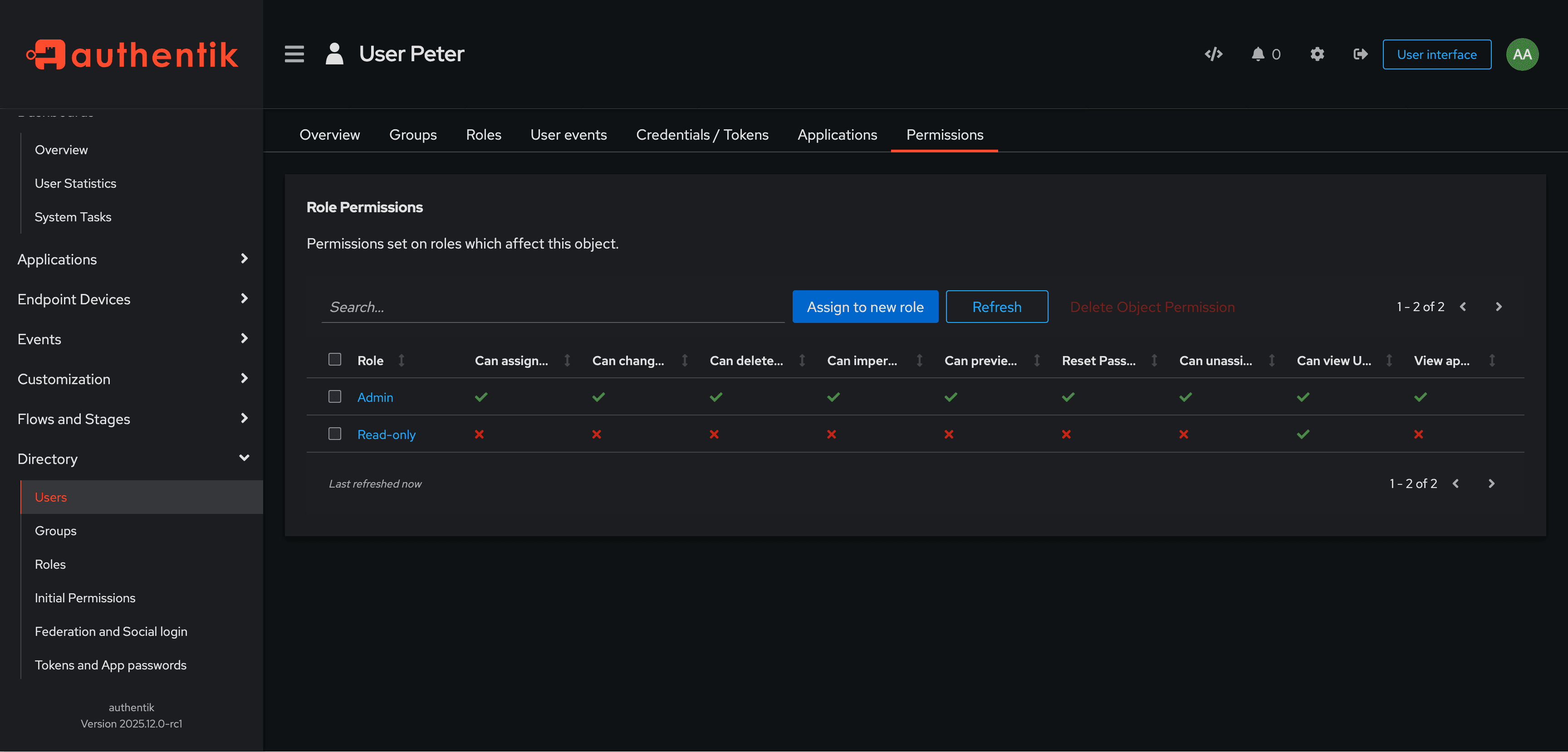
You can see in the Permissions on this object table that the Admin role and one other role (Read-only) have permissions on Peter (that is, on the user object named Peter). The Admin role has all object permissions on this object, while the Read-only role has only the view permission.
Hover over a checkmark to see whether that permission is granted by a global permission or an object permission.